
Online payment of ARPCE invoices

The Regulatory Authority is launching a new website for paying bills online , designed to provide its Eddahabia and CIB cardholder customers (hereinafter “users”;) with a secure, fast and convenient payment experience.
The Regulatory Authority invites its users to log on to epay.arpce.dz, or by selecting the “e-payment” section on its website, and follow the steps to proceed with bill payment.

Accessing the website and entering information
Once you have received your bill, there are a number of ways to pay electronically via the dedicated website:
- Via the hypertext link received in the email notification,
- Scanning the QR code on your bill using your mobile phone,
- By accessing the ARPCE e-payment facility directly (direct access or via the website).
Users must fill in the form fields by inserting the Invoice Code and the Customer Code mentioned on their invoice. This information will be filled in automatically when they access the form via the hypertext link (received by email) or by scanning the QR code on their invoice.
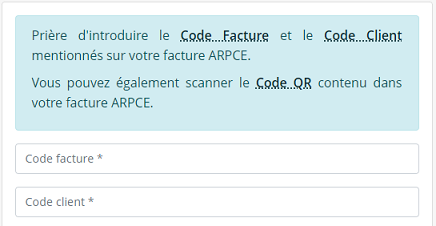
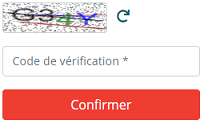
The user will have to enter the “Captcha” verification code in order to confirm their information and then click on the “Confirm” button in order to view the details of their payment.
Validation of ARPCE online payment
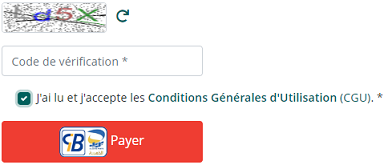
The customer will be asked to confirm the payment by entering the corresponding Captcha code for a second time and accepting the General Terms and Conditions of Use (“CGU”); they must then click on the "Pay" button.
Once confirmed, users must enter their Eddahabia or CIB card details and password in the form below.
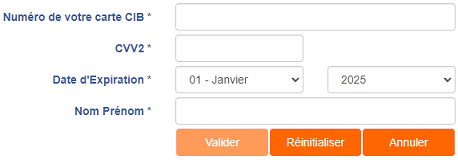
The CVV2 is the number on the back of the CIB or Eddahabia card, which confirms the authenticity of the card; it corresponds to the last three digits of the number located in this space. This code enables the bank to check that the card in question is actually present and in the user’s possession during an online transaction.
A page confirming the payment transaction is then displayed. Users can download and print the payment receipt and send it to the email address of their choice.